
Querying 1 Thousand JSON Files From S3
And Pitting DuckDB against Spark


A common task I have to wrangle with is reading JSON files from an object store; And from all I have seen over the years, its actually quite memory intensive for engines like Spark and DuckDB to deserialize JSON and read it in; however, I figured I should go ahead and finally build a benchmark and compare the 2; and that’s exactly what this article will cover today.
We will be pitting 2 AWS services against each other to see which one can process the 1K JSON files the quickest and cheapest. While most of the files are 15kb in size or less, I am throwing a common wrench into this test:
we will have a handful of the files exceed 20MB in size. The purpose behind this is two-fold - It will definitely generate some skew on the parallel processing; however, this also happens in the real world; not every file and/or process follows the happy path. You end up with some easter egg files here and there.
For the 2 AWS services we will be benchmarking, they will be ECS Fargate using DuckDB and AWS EMR Serverless using Spark. Although AWS offers Glue as another serverless spark service (try saying that phrase 5 times fast….), I ultimately chose EMR over glue to get a more “pure spark” setup.
The Fabricated Data
The fabricated data represents retail return chat conversations. Here’s a sample of what it looks like:
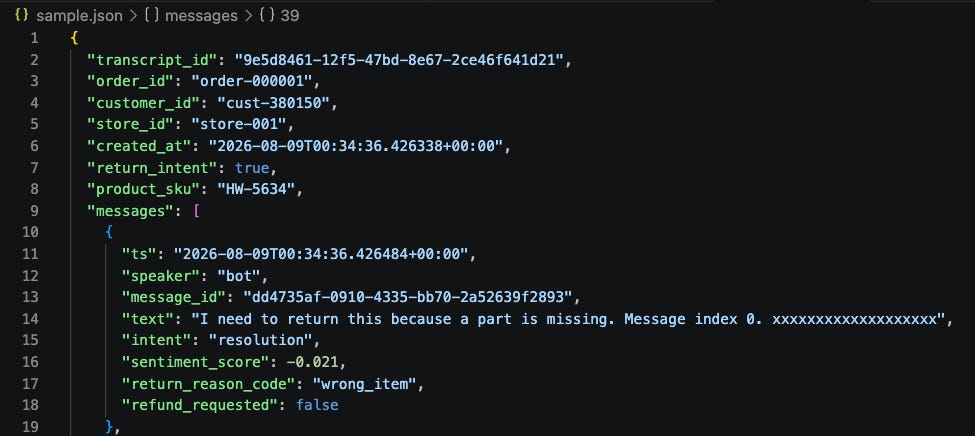
The actual script that creates these 1,000 files and slings them all up to S3 can be found here.
The AWS Infrastructure
If you have followed along from some of my earlier articles, you will understand why using Terraform to deploy all the infra makes sense. You can quickly spin up and spin down these things and not incur a sizable bill at the end. What our terraform will deploy is:
AWS ECS Cluster and Task (Task is the actual ETL job)
AWS ECR Repository + Docker Image that hosts the code
AWS IAM roles to execute the ECS task
AWS EMR Serverless application
AWS IAM role to execute EMR job
typical cloud watch log stuff
To deploy the infra, we can run this simple bash script:

And if all goes well, after about 2 minutes, we should see this:

And Now The ETL
…and this is where things might get a little subjective so strap in 🤣.
The general premise of the ETL is that it will perform the following steps:
Read in the raw json files from s3
flatten it
do some aggregation to get things like message counts, order counts, etc
write aggregate results back out to a json file on S3
Here’s a link to both the DuckDB ETL script and the Spark ETL script:
One of the things I try to always avoid on ETL jobs is multiple round-trips to the object store. To do so, with DuckDB, I’m creating an in-memory DuckDB database and reading all the S3 files in there once. From there, DuckDB then runs queries to flatten, aggregate, and copy out. With Spark, you don’t really get that benefit of jamming the raw data into a local database. However, Spark “should” be smart enough as it builds logical plans to know what it can cache on its workers and reuse as we build temp global views. Thus, the spark version may or may not make a few trips to S3. But it’s hard to determine unless you go really deep into the logs. Thus, we will just trust that Spark will make the smart decision here on when and how many times it wants to hit S3 vs. caching the data.
Running the Benchmark
To run a benchmark, I have a handy shell script. You can provide it a run date so when it puts the results in S3, it’s saved off in a folder by that run-date+a unique ID. To execute the shell script, we run the following in terminal:

What this does is the following:
runs the ECS Fargate DuckDB job
subsequently runs the EMR Serverless Spark Job
To ensure we have some consistency, I ran each benchmark 3 times so we could get multiple runs and have a good idea of the overall time. And to make that easy, I created another bash script called “run_benchmark_batch.sh” which can be found here.
The Results
Below is a summary of the results for all 3 benchmarks:
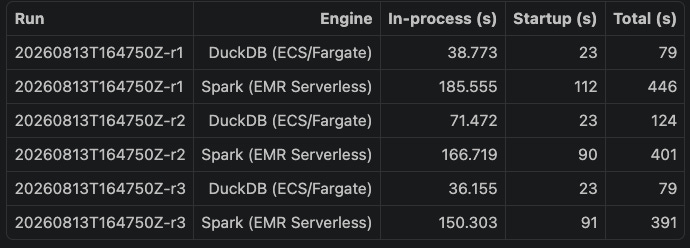
To isolate start-up times, I have in each ETL script a timer capturing the actual start of the data read from S3 to when it finishes writing the aggregate file back to S3. On average, DuckDB running on ECS fargate had an in-process time of 48.8 seconds, whereas EMR serverless on average took 167.53 seconds. No doubt the skew of the 20MB files played into causing EMR and its Spark plan to have some issues. However, it’s fascinating that DuckDB was able to just deal with all this at a remarkably faster speed.
For those wondering how much CPU/RAM I provided each service, here you go:
ECS Fargate - 2 CPUs, 4 GB RAM
EMR Serverless - Max 8 processors and 32GB Ram
That is a ceiling of what EMR can use; its serverless model will actually optimize the query plan and flex up/down the needed resources so it might not use all 32GB of RAM nor all 8 processors.
One other thing that was very interesting to watch was the start-up time for both services. ECS fargate was like clockwork at 22-23 seconds to fire up and start running. Spark had a little more variability and definitely took more time; however, to be fair, Spark is having to acquire more resources than ECS Fargate.
The Financials
Now to a more interesting aspect of this benchmark; I wanted to try and get close to exact costs for each service. To do so, I used AWS’s cost explorer (CE) and turned on our benchmark ID in the cost explorer allocation tags. AWS Cost explorer has a lag of 24-48 hours for allocating down to tags; as of this writing, it was able to get the real costs for ECS Fargate; however, the EMR jobs have not propagated the costs to CE yet, thus they are an estimate below:
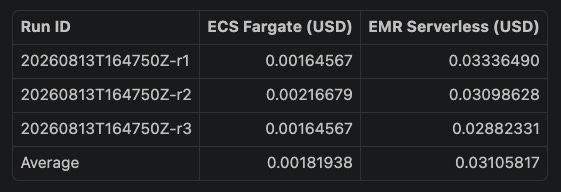
The EMR serverless cost estimate is based on the bill vCPU-hour and memoryGB-hour we were able to pull from the EMR logs.
As you can see, the cost to run ECS Fargate is significantly less than EMR serverless; so DuckDB wins on both speed and cost here.
Tearing Down the Infra
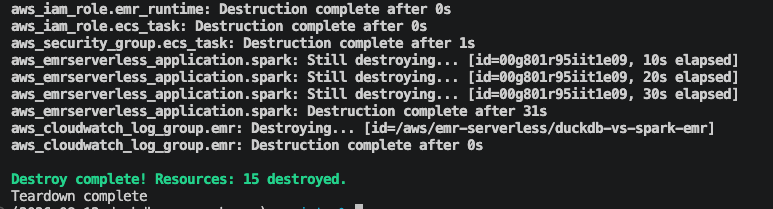
This is probably the most satisfying part of the testing. I can run a simple bash script below that nukes all the AWS infrastructure I spun up:

And if all goes well, you should see this message after about 1 minute:
Conclusion
I’m not looking to start a war here with the Spark evangelists; am I using the right tool for the right job? maybe and maybe not; the data is definitely not GB of size; however, I wanted to demonstrate that many workloads today that use Spark to process data like this can probably benefit by transitioning over to the Duck; you will get a decent speed boost and you will also make your employer happy by saving some $$$, especially if you are running hundreds or thousands of daily jobs that fit this size of data. Those 3 cent runs can add up very quickly.
Another thing to remember is you can easily run the DuckDB jobs locally from your laptop; so QA and testing scripts is much easier vs. sending spark jobs up to EMR and praying to the AWS gods that no errors occur after waiting a few minutes.
As always, the code link is below and you are welcome to pull it and test it yourself and run your own benchmarks, if you think mine are sus (learned that word from my kids recently 😄).
Thanks for reading,
Matt